CTO commentary by Ilya Ilin
On November 12, Microsoft reported problems accessing Exchange Online mailboxes. The next day, Singapore Courts said its incoming and outgoing email was disrupted while online filing and its system notifications kept working. It published a phone number for urgent matters and confirmed normal email service on November 14. Its recovery notice asked people still waiting for a response to resend their correspondence.
For a business that takes urgent support requests by email, the equivalent question is simple. If a customer cannot reach your usual inbox, where can they get a case number and a reply from someone who can help? Work through that one request before buying a second email service.
Start with a request that cannot wait
Imagine you sell inventory software and new orders stop appearing in a warehouse’s dispatch queue. The shift supervisor has your support address saved. Your agents use a ticketing tool that creates cases from that inbox. The ticketing tool may show all green while new urgent requests sit upstream.
Write down how the supervisor finds help, how the case reaches an agent and how the agent replies. Check where that chain uses Exchange, mail-based sign-in codes, company single sign-on or a shared integration. A support portal can be hosted separately and still ask agents to sign in through a service they cannot reach. Test those dependencies separately.
Ask how long the warehouse can keep dispatching with its existing orders and whether a supervisor can switch to a manual process. That gives you a time limit for a human response. Choose who activates the fallback and when. A test request that stops reaching the queue can tell you to act while the provider’s incident report is still catching up.
Give customers a route your team can staff
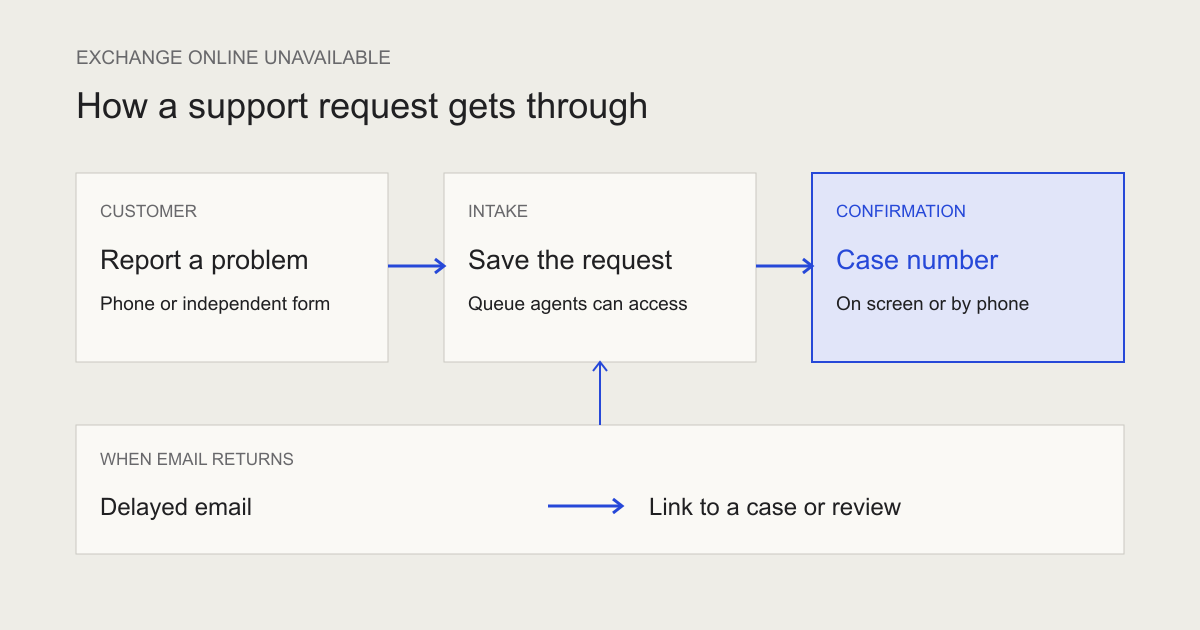
For a small customer base and a short disruption, a staffed phone line may be enough. Publish the number in the product and on a status page customers can open without signing in. Give the person taking calls a place to record a case and an escalation contact they can reach without the mailbox. Set hours and assign backup coverage before an incident.
For more requests or coverage across time zones, consider an independent web form. Have it save to a case queue and show the case number on screen after the write succeeds. If saving fails, show that the request was not confirmed and give a working fallback. Choose a queue agents can open and answer from during the failure. A form that only forwards mail to the same tenant shares the original bottleneck.
Keep anonymous intake narrow. Ask for a way to respond and a short description. Use a verified channel for account details and files. Retain the usual permissions and deletion rules in the fallback, including when an operator uses a separate service to take calls.
Reconcile delayed mail before closing the incident
The warehouse supervisor may submit the form and also email the usual address. On recovery, link the messages to one case when the reference and the requester match. For an exact mail replay, deduplicate using the message identifier within the intake mailbox. Give form retries the same submission identifier if the first response was lost. Send ambiguous matches to a person for review. A shared subject or customer name is too weak a match.
Microsoft’s message trace can show whether Exchange received, deferred, rejected or delivered a message. Compare that trace with what your ticketing tool imported and what agents acknowledged. A delivered message can still be waiting for an importer or a person. Assign someone to clear the unlinked mail and report the age of the oldest unassigned case before you close the incident.
The courts’ request to resend unanswered correspondence shows why recovery needs its own queue review. Decide how your team will identify requests still waiting and tell customers which route to use. Check their case reference before asking them to submit again.
Run the drill from a customer’s browser
In a test environment, disconnect the mailbox integration. Use a fresh browser and test accounts. Let one request arrive through the fallback, then replay a delayed email when you reconnect the test integration. Give the shift lead these checks.
- A customer can find the fallback and get a case number without receiving an email.
- An agent can open the case, claim it and respond through the agreed channel. Record the time from submission to the first human reply.
- After the mailbox returns, the delayed email is linked or flagged for review. The team can account for every test request and see what is still waiting.
Spend on the step that failed
If the phone line works but callers wait too long, fund coverage. If cases are recorded and agents cannot open them, fix their access before adding more intake channels. A separate form and case store are worth considering when the call volume or the need to serve customers around the clock outgrows a phone line. Budget for who owns it, who updates access and how the team returns to the normal queue.